Annual reviews people actually prepare for
Most annual reviews follow the same script. HR sends a form, the employee fills it in the night before, the manager reads it for the first time in the meeting, and the signed document goes into a folder nobody opens again. The conversation could have been the most useful hour of the year. It ends up as paperwork.
The fix isn't a longer form. It's a better sequence: each side prepares on its own, the meeting starts from what they wrote, and what was agreed is written down once and kept.
Let each side prepare on its own
Split the review into two parts: one for the employee, one for the manager, with the same questions or different ones. Each answers without seeing the other's draft, so the employee's self-assessment isn't shaped by the manager's, and the manager doesn't anchor on what the employee wrote. In Interview & 1:1, this is a Cross Review template: the employee's part and the manager's part are filled in separately, and each question can be visible to one side, the other or both.
Give people time, not a night
Preparation needs a window. Launch the reviews as one campaign with a start date and a deadline set well before the meetings, so people can answer over several days. Answers save as you type, so a review can be started on Monday and finished on Thursday, on a computer or in the mobile app. When the deadline gets close, send reminders to the people who haven't submitted rather than chasing them one by one.
Spend the meeting on the gaps
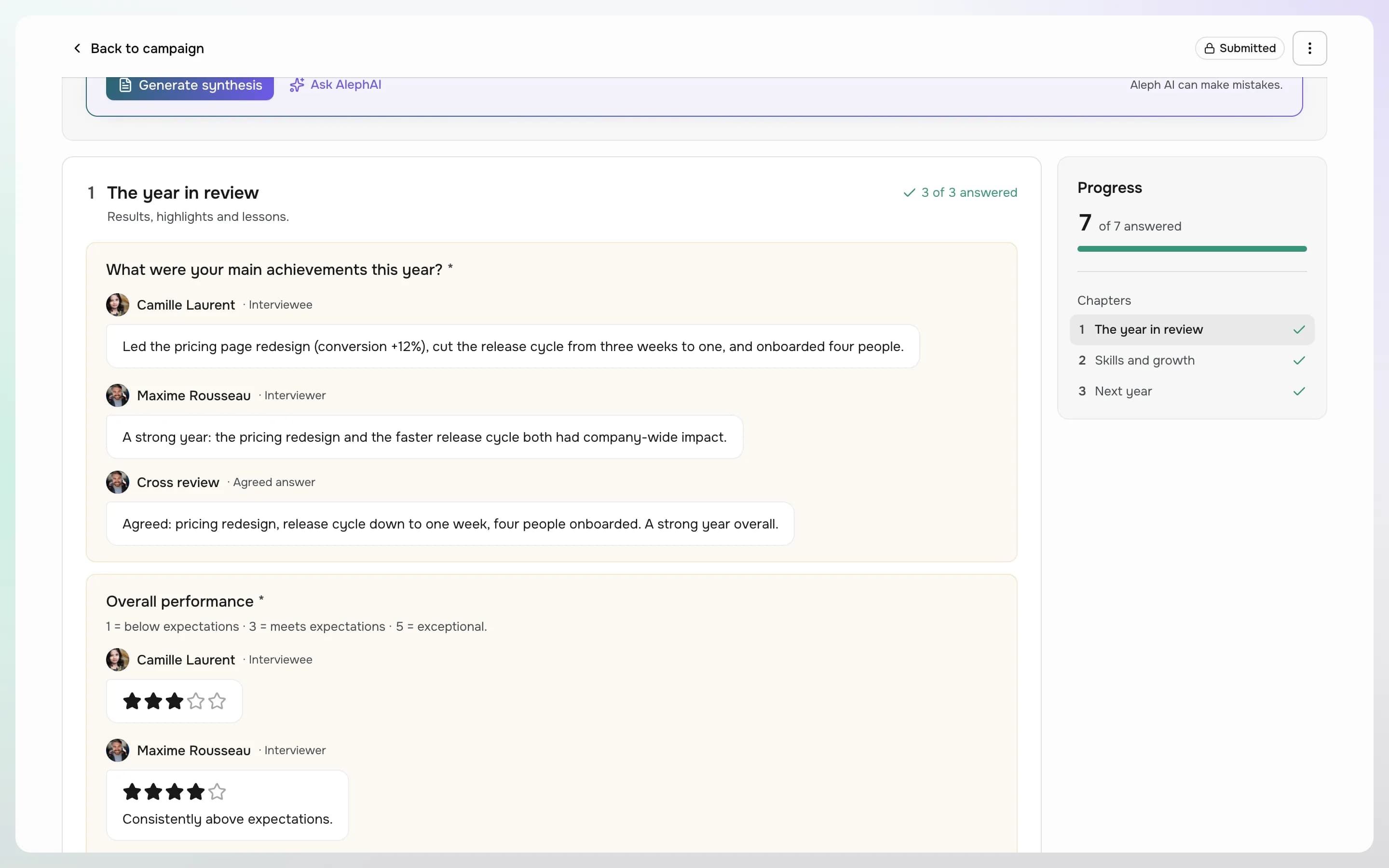
Once both parts are submitted, the manager can read the employee's answers before the meeting. The cross review then opens: a final version of the interview, pre-filled with the answers already given, with the employee's and the manager's answers shown above each question. The meeting no longer starts with reading. It starts with the questions where the two answers differ, and ends with one agreed answer for each.
Lock what was agreed
Submitting the cross review locks it. The employee can read the final version, a history records who submitted what and when, and a PDF can be downloaded if your process needs a signed copy. If someone submitted by mistake, an admin can unlock their part; nothing is lost.
Read the whole campaign, not only one interview
A campaign of annual reviews says a lot about the company, if someone has time to read it. With Aleph AI, in beta, a manager can generate a synthesis of a submitted interview: a summary, a sentiment, the main themes and suggested actions by priority. The people running the campaign can also ask questions about all its submitted answers, such as the training needs that come up most often, and each answer lists the interviews it is based on. AI only reads submitted interviews, and its output is a draft to check, not a verdict.
A checklist before you launch
- If managers conduct the reviews, check that every employee has the right manager on their profile: that's who will be asked.
- Choose who answers: the employee, the manager, both, or both and then a joint cross review.
- Decide, question by question, who can see it and who must answer it.
- Translate the template if your teams read in several languages, by hand or with AI.
- Set a deadline that leaves a week between the last answers and the first meetings.
- Tell managers they will see the employee's answers before the meeting, and expect them to read them.
The same sequence works for the other structured conversations of the year: probation reviews, professional development interviews and regular 1:1s. Only the template changes.
Products in this article
See OpenAleph for yourself
Book a walkthrough built around your team.
More articles
- EngagementFrom answers to actions: running an engagement surveyAn engagement survey is easy to send and hard to use. Anonymity, questions, results and the next round: how to run one people trust and HR can act on.
- GoalsOKR or individual goals: which one, and whenBoth are called objectives, and companies often run one when they need the other. What OKR and individual goals are each for, and how to write key results that measure.
- SkillsHow to build a skills matrix from a competency frameworkA skills matrix usually starts as a spreadsheet and stops being true the day a job changes. Here's how to build one from a framework, review cycles and a talent matrix.