Leave and absence management without the spreadsheet
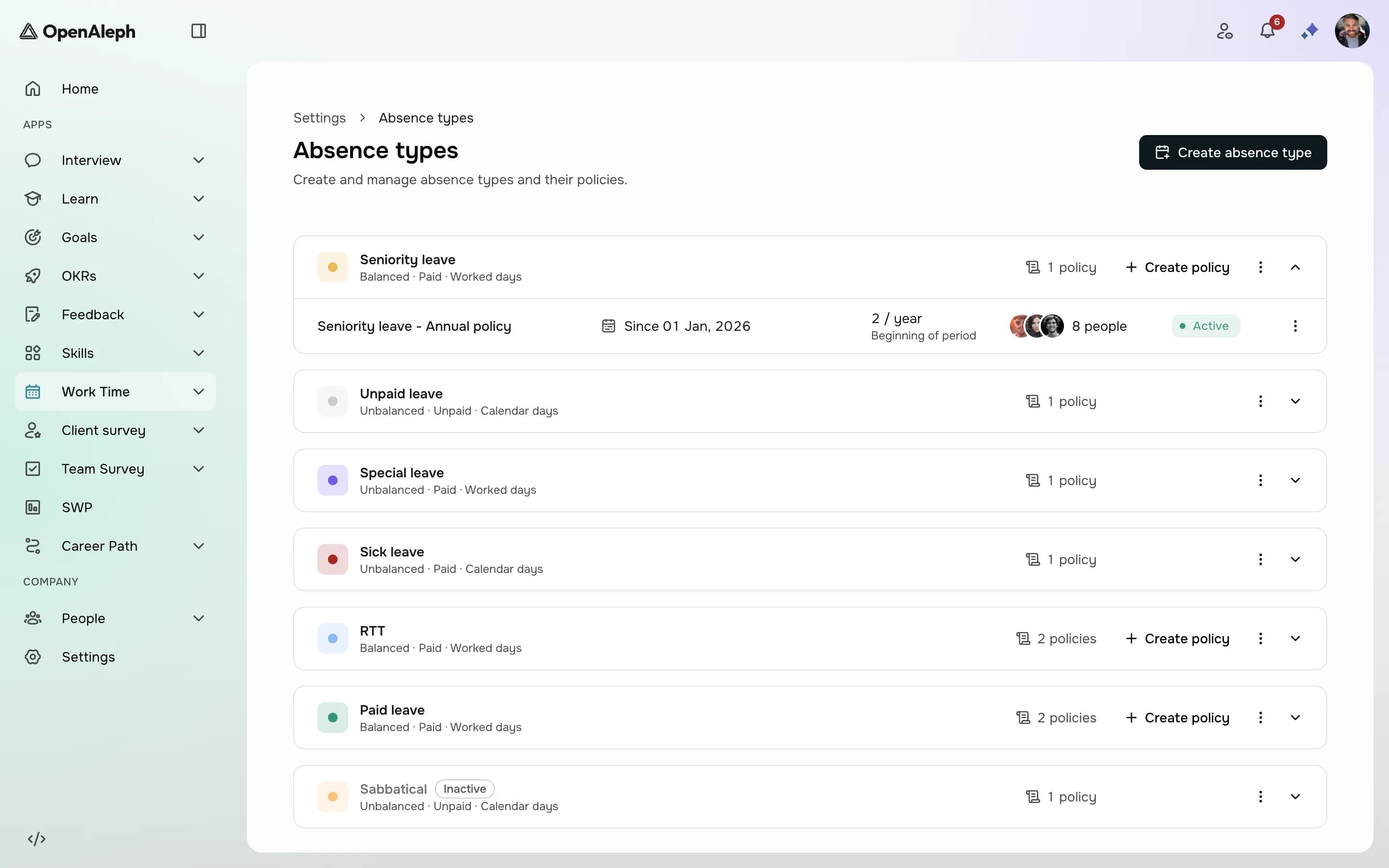
In many companies, leave still runs on email and a spreadsheet. An employee asks their manager, the manager says yes, someone updates a file, and at the end of the year nobody agrees on how many days are left. Moving leave into a tool only helps if the rules are set up first. Here's the order that works.
Start with your absence types
List every kind of absence your company recognises: paid leave, RTT, sick leave, unpaid leave, special leave. For each one in WorkTime, decide two things. Does it use a balance (paid leave does, sick leave usually doesn't)? And how are days counted: worked days, open days from Monday to Saturday (the French "jours ouvrables"), or calendar days? Getting this right once means nobody counts by hand again.
Write the accrual rules down, once
A balance needs a rule: how many days are earned, every month or every year, at the start or the end of the period, and until when they can be used. That's a policy, and each employee is assigned to one. Balances are then credited automatically. Decide whether a policy may go below zero, so a request beyond the balance is either blocked or flagged to the manager.
Set working weeks and holidays
An absence costs the days the person would have worked. Everyone follows a default Monday-to-Friday week unless you assign them another schedule, for part-time staff or a retail week with Saturdays. Add your public holidays and closing days: fixed dates can repeat every year, and movable ones like Easter Monday are added year by year. Holidays apply to the whole company.
Let managers approve where they already are
An employee requests a full or half day, attaches a document if needed, and their manager is notified by email, in the app and by push on their phone. The manager approves or rejects with a message, one request at a time or several at once, and is warned if approving would put a balance below zero. The employee is notified, and the days come off the balance only once a request is approved.
Give everyone the same view of who's off
The planning shows who is away across a team or the company. Managers see the details for the people who report to them; everyone else sees "Absent", without the reason. Admins can add an absence for several people at once, adjust a balance, and export the absence planning or the balance history to Excel.
Before you switch
- Set the right manager on every profile: they're the one notified of each request.
- Create absence types and policies before setting anyone's opening balance.
- Check part-time staff are on the right working week.
- Add next year's movable holidays before people start asking for them.
- Run one month alongside the old spreadsheet, then retire it.
Products in this article
See OpenAleph for yourself
Book a walkthrough built around your team.
More articles
- EngagementFrom answers to actions: running an engagement surveyAn engagement survey is easy to send and hard to use. Anonymity, questions, results and the next round: how to run one people trust and HR can act on.
- GoalsOKR or individual goals: which one, and whenBoth are called objectives, and companies often run one when they need the other. What OKR and individual goals are each for, and how to write key results that measure.
- SkillsHow to build a skills matrix from a competency frameworkA skills matrix usually starts as a spreadsheet and stops being true the day a job changes. Here's how to build one from a framework, review cycles and a talent matrix.